This example shows all incoming and outgoing MIDI messages on an SSD1306 OLED display. This can be handy for debugging purposes when you don't have access to the Serial Monitor.
#include <Adafruit_SSD1306.h>
constexpr uint8_t SCREEN_WIDTH = 128;
constexpr uint8_t SCREEN_HEIGHT = 64;
constexpr int8_t OLED_reset = 8;
constexpr int8_t OLED_DC = 9;
constexpr int8_t OLED_CS = 10;
Adafruit_SSD1306 disp {
SCREEN_WIDTH, SCREEN_HEIGHT, &SPI, OLED_DC,
OLED_reset, OLED_CS, SPI_Frequency,
};
void init_display() {
if (!disp.begin())
disp.setTextColor(SSD1306_WHITE);
disp.setTextSize(1);
disp.cp437();
disp.clearDisplay();
disp.display();
}
void shift_display(uint8_t lines = 1) {
auto buf = disp.getBuffer();
auto end = buf + SCREEN_WIDTH * SCREEN_HEIGHT / 8;
std::move(buf + lines * SCREEN_WIDTH, end, buf);
std::fill(end - lines * SCREEN_WIDTH, end, 0);
disp.setCursor(0, SCREEN_HEIGHT - 8 * lines);
}
constexpr const char *abbrev_midi_status_names[] {
"Note Off", "Note On", "Key Pres", "Ctrl Ch",
"Prog Ch", "Ch Pres", "Pitch Bend"};
class OLEDDebugMIDI_Output :
public MIDI_Sender<OLEDDebugMIDI_Output>,
public:
OLEDDebugMIDI_Output(const char *prefix = nullptr) : prefix(prefix) {}
private:
friend MIDI_Sender<OLEDDebugMIDI_Output>;
void sendChannelMessageImpl(ChannelMessage msg) {
uint8_t messageType = (msg.
header >> 4) - 8;
if (messageType >= 7)
return;
shift_display(1);
if (prefix != nullptr)
disp << prefix << ' ';
if (print_cable)
disp << abbrev_midi_status_names[messageType];
else
disp << abbrev_midi_status_names[messageType] <<
' ' <<
hex disp.display();
}
void sendSysCommonImpl(SysCommonMessage msg) {
shift_display(1);
if (prefix != nullptr)
disp << prefix << ' ';
if (print_cable)
disp.display();
}
void sendSysExImpl(SysExMessage msg) {
const uint16_t bytes_per_line = 7;
uint8_t lines = (msg.
length + bytes_per_line - 1) / bytes_per_line;
shift_display(1 + lines);
if (prefix != nullptr)
disp << prefix << ' ';
if (print_cable)
uint16_t i = 0;
uint16_t rem = msg.
length - i;
uint16_t len = std::min(bytes_per_line, rem);
disp.println();
disp <<
' ' << AH::HexDump(msg.
data + i, len);
i += bytes_per_line;
}
disp.display();
}
void sendRealTimeImpl(RealTimeMessage msg) {
shift_display(1);
if (prefix != nullptr)
disp << prefix << ' ';
if (print_cable)
disp.display();
}
void sendNowImpl() {}
const char *prefix;
bool print_cable = false;
};
OLEDDebugMIDI_Output midi_disp_in {"\x1a"};
OLEDDebugMIDI_Output midi_disp_out {"\x1b"};
void setup() {
init_display();
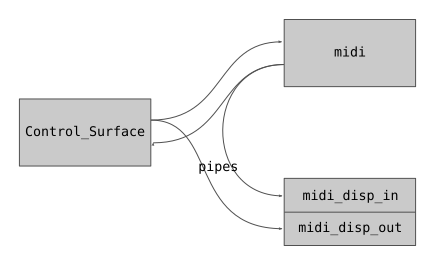
midi >> pipes >> midi_disp_in;
}
void loop() {
}
The main header file that includes all Control-Surface header files.
Control_Surface_ & Control_Surface
A predefined instance of the Control Surface to use in the Arduino sketches.
constexpr uint8_t getOneBased() const
Get the cable as an integer.
constexpr uint8_t getOneBased() const
Get the channel as an integer.
void setAsDefault()
Set this MIDI interface as the default interface.
Statically polymorphic template for classes that send MIDI messages.
void send(ChannelMessage message)
Send a MIDI Channel Voice message.
virtual void sinkMIDIfromPipe(ChannelMessage)=0
Accept an incoming MIDI Channel message.
A class for MIDI interfaces sending MIDI messages over a USB MIDI connection.
#define FATAL_ERROR(msg, errc)
Print the error message and error code, and stop the execution.
Print & hex(Print &printer)
Print & uppercase(Print &printer)
Print & dec(Print &printer)
MIDI_Sink TrueMIDI_Sink
A MIDI_Sink that is not a MIDI_Pipe.
static constexpr Frequency SPI_MAX_SPEED
MIDIMessageType getMessageType() const
Get the MIDI message type.
Channel getChannel() const
Get the MIDI channel of the message.
bool hasTwoDataBytes() const
Check whether this message has one or two data bytes.
static constexpr auto PitchBend
uint8_t header
MIDI status byte (message type and channel).
Cable getCable() const
Get the MIDI USB cable number of the message.
uint8_t getData1() const
Get the first data byte.
uint16_t getData14bit() const
If Data 1 and Data 2 represent a single 14-bit number, you can use this method to retrieve that numbe...
uint8_t getData2() const
Get the second data byte.
Class that produces multiple MIDI_Pipes.
Cable getCable() const
Get the MIDI USB cable number of the message.
MIDIMessageType getMessageType() const
Get the MIDI message type.
uint8_t getNumberOfDataBytes() const
Get the number of data bytes of this type of System Common message.
MIDIMessageType getMessageType() const
Get the MIDI message type.
Cable getCable() const
Get the MIDI USB cable number of the message.


 1.17.0